Valheim 1.0.16
Live Seed Map mod for Valheim: install it, connect it and track places in your game
Live Seed Map is a Valheim mod that links your running game to the seed map. The map follows you as you play, lists the creatures around you and your portals, and keeps your pins in step with the game. In the other direction, any place you pick on the map appears in your game as a ping with its distance, seen only by you. The mod works in single player, as the host and on a dedicated server, on Windows and on Mac.
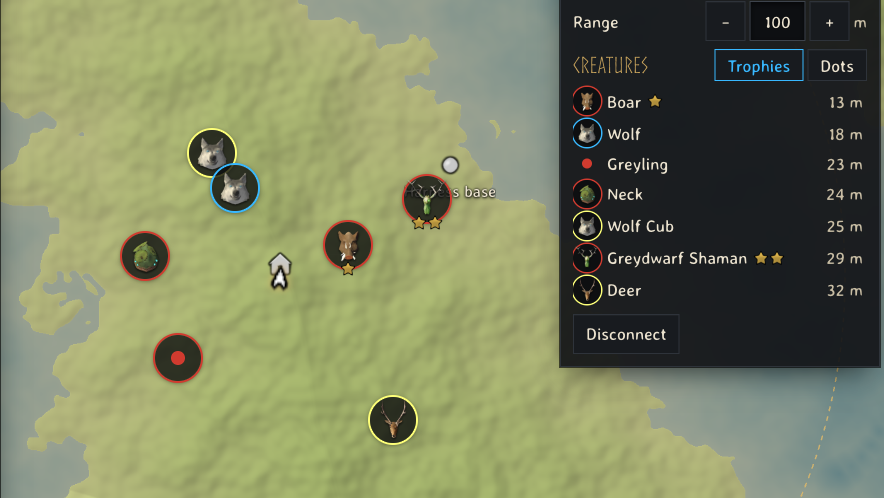
What does the seed map show while you play?
- You, as the game's own map arrow, turned the way you face.
- Other players, the same ones the in-game map shows: only those who share their position.
- Creatures around you, each as its trophy on a ring that says whether it is hostile (red), tamed (blue) or passive (pale), with its stars. A young animal shows its adult's trophy, and a creature without a trophy, such as a Greyling, keeps a dot. Dots beside the creature list turns every creature into a small dot in the same colours.
- Your map pins, with the game's pin icons and the cross on the ones you checked off.
- The trader camps your world kept. Haldor, Hildir and the Bog Witch each have ten possible camps on the seed map. Once your game has placed one, the map rings it in gold and hides the other nine, which your world no longer has.
- Your ship under your arrow, turned the way it sails, with its speed.
- The wind, its direction and strength, as the in-game map shows it; on a ship, turned to your bow.
- Fog of war, when you turn it on: the ground your map has not explored yet, dimmed.
How do I install Live Seed Map?
The mod runs on BepInEx.
| Your setup | Download | What to do |
|---|---|---|
| r2modman, Thunderstore Mod Manager or Gale | thevalheimwiki-LiveSeedMap-1.4.0.zip | Install BepInEx Pack Valheim from the manager's list, then import the zip as a local mod (in r2modman: Settings, Import local mod). Start the game with the manager's modded button. |
| Vortex, or by hand | LiveSeedMap-1.4.0.zip | Install BepInEx Pack Valheim, then drop the zip on Vortex's mods page, or unpack it into your Valheim folder so that BepInEx/ exists. |
| Mac | LiveSeedMap-1.4.0.zip | The Windows mod managers do not run on macOS. Follow Valheim mods on a Mac: it installs BepInEx natively on Apple Silicon and this mod as its example. |
The SHA-256 sums of every file are in SHA256SUMS.txt. Version 1.0.1 stays available as thevalheimwiki-LiveSeedMap-1.0.1.zip and LiveSeedMap-1.0.1.zip. The seed map reads every version and offers what that version supports.
When the mod has loaded, the BepInEx log (BepInEx/ in your
Valheim folder) has the line Listening on http:/.
How do I connect the game to the seed map?
- Start Valheim with mods and load your world, or join your server.
- Open the seed map in Chrome or Edge and press Connect game in the Your game panel. The browser asks once whether the page may reach apps on this device; allow it.
- If the map shows another seed, the panel says which seed your game runs. Press Open its map.
The map remembers the connection. Next time it finds your game by itself, and when you start the game after opening the page, switching back to the page connects it.
What does each switch in the Your game panel do?
| Switch | What it does |
|---|---|
| Follow | Keeps the map centred on you. Dragging the map or opening a card pauses it; it picks up again once you walk on in the game. |
| Sync pins | Keeps your pins on the seed map and in the game the same, checked crosses included. |
| Fog of war | Dims the ground your map has not explored yet. |
| Range | How far around you creatures are listed, up to the ground the game keeps loaded around you. |
| Stop tracking within 10 m of the target | Removes a tracked place once you reach it. |
Players lists the other players with their distance, and Creatures lists the creatures in range, nearest first. Each creature links its page.
While your game is connected, every search and distance on the map counts from where you stand instead of the starting stones: the nearest Copper Ore, Troll cave or water for Northern Salmon.
How do I see a place from the map in my game?
Pick a place on the seed map and press Track in game. Your game shows it as a blue ping with its name and distance, like a ping from another player, but it stays until you remove it. Turn away and it waits at the edge of your screen; your minimap and large map show it as a pulsing pin. Other players do not see it.
Track in game appears while your game is connected, plays the seed the map shows and has you in the world. It is on:
- the card of a location or of a resource on the map;
- your own pins on the seed map;
- a portal row in the Portals panel, which tracks the end nearest you;
- the pins of your game drawn on the map;
- any spot on the world: right-click it.
The panel shows the tracked place with its distance and Stop. A new place replaces the last one. Leaving the world clears it, and so does reaching it when Stop tracking within 10 m of the target is on.
How do I find my portals?
The Portals panel, under Your game, lists every portal your game has loaded:
- Pairs, both ends with their tag and how far apart they are, and while your game is linked, how far the nearer end is from you.
- Single portals, with a tag no other free portal has, or linked to a portal the mod has not seen yet.
- Groups of three or more free portals sharing one tag, which the game links at random.
Click a row to show those portals on the map, joined by a line; click it again, or Clear from map, to hide them.
On a dedicated server your game only knows the portals around where you have
been. The mod remembers every portal it has seen, per world, in
BepInEx/, and asks the server for the far end of a linked
portal the way the game does when you stand at one. Playing fills the list in.
Without the mod, loading your world folder on the seed map fills the same
panel from the save.
How do I show an item or creature from the game on the map?
In the game, point at an item or a creature and press J: in your inventory, in a chest, in the crafting list, on the ground or at the creature itself. The seed map shows where to find it; press J again on the same thing to clear it. The map's bottom bar reminds you of the key, also when you change it.
Can the seed map change my game?
Only if you let it:
- Pins. With
AllowPinWrites = true, the seed map may add, remove and check off your own fire, house, hammer, dot and portal pins, and nothing else. Off, which is the default, Sync pins only brings the game's pins to the map, and the panel says how to turn writes on. - Tracking. A tracked place is a ping drawn only in your own game. With
AllowTracking = false, Track in game shows as unavailable.
The mod answers only on 127.0.0.1, the address of your own computer, and
only to pages from thevalheim.wiki. Nothing it reads goes over the internet or
to our servers, and it changes nothing in your world or your character beyond
the pins you allow.
How do I change the mod's settings?
The mod writes its settings file, BepInEx/,
the first time Valheim starts with it. There are two ways to change them:
- In the game, with Valheim Configuration Manager installed: press F1 (fn and F1 on a Mac keyboard) and open Live Seed Map. A change applies at once, except Origins, which applies at the next start.
- In the file: quit Valheim first, edit the file in any text editor, then start the game. Valheim reads the file when it starts, and a change made in the game while it runs can overwrite your edit.
| Setting | Section | Default |
|---|---|---|
ShowOnMapKey | [Keys] | J |
Interval | [Link] | 0.25 |
Origins | [Link] | https:/ |
AllowPinWrites | [Pins] | false |
AllowTracking | [Track] | true |
ClearWithin | [Track] | 0 |
Show-on-map key: ShowOnMapKey
The key that shows the item or creature you point at on the seed map. Change
it when another mod or a chat bind already uses J. For a combination, write
the main key first, then the keys held with it, joined by +:
J + LeftControl is Control and J. Key names are Unity's: F5, Keypad1,
LeftAlt, RightShift. None turns the key off, and the map stops showing
its reminder.
Update interval: Interval
Seconds between the updates your game sends to the map. A lower value moves
your arrow and the creatures more smoothly; a higher one asks less of the game.
Anything below 0.1 counts as 0.1. Write decimals with a point: 0.5.
Versions before 1.2.1 sent an update every second, and a settings file they
wrote keeps 1 until you change it.
Allowed pages: Origins
The web pages allowed to read your game, separated by commas. Leave it at
https:/ unless you have a reason: any page on this list can
read everything the seed map reads, and send what the seed map sends. It
applies at the next start.
Pin writes: AllowPinWrites
With false, the seed map only reads your pins. With true and Sync pins
on, it can also add, remove and check off your own fire, house, hammer, dot
and portal pins, the five kinds you place on the large map. Death markers,
your bed and pins other players shared through a cartography table are never
changed.
Tracking: AllowTracking
With true, the seed map can show a place in your game as a ping only you
see. With false, Track in game shows as unavailable on the map, and a
ping already shown disappears.
Arrival distance: ClearWithin
The distance in metres at which the game removes a tracked place when the
request does not set one; 0 keeps the ping until it is removed. The seed map
always sets its own distance, 0, or 10 m with Stop tracking within 10 m of
the target on, so this setting only matters for another program that sends
targets to the mod.
The old Port line
A settings file first written by version 1.0.0 may still hold a line
Port = 45892 with no description above it. The mod no longer reads it: the
port is always 45892, the one the seed map looks for.
When the map does not find your game
- Game not found: the game is not running with mods, or the world is not loaded yet. Load the world, then return to the page.
- The browser blocked it: in Chrome or Edge, open the site settings of thevalheim.wiki and allow the access to apps on this device you refused.
- Port taken:
BepInEx/says that port 45892 is taken. Close the program that holds it.LogOutput.log - Tracking is off in your game: set
AllowTrackingtotrue. - Your game only shares its pins: set
AllowPinWritestotrue.
Tools & mods
- How to install Valheim mods on a Mac, natively on Apple Silicon without Rosetta
- Valheim live map: your running game on your seed map
- Valheim save file location for worlds and characters on Windows, macOS and Linux
- Valheim seed map guide: where your world's bosses and traders are
- Valheim food and gear planner: check armour and health before a boss
- Valheim build cost calculator: total materials for a whole build
- Valheim fishing: the bait for each fish, where it spawns and how to land it