Valheim 1.0.15
Valheim live map: your running game on your seed map
This page covers version 1.0.1 of the mod. The current version adds portals, pin sync, fog of war and tracking places in your game, and its guide covers installing on Windows and on Mac: read the Live Seed Map guide.
The seed map shows everything your seed places, from the first Meadows to the Ashlands, before you have explored any of it. The Live Seed Map mod adds your running game to it: where you stand, which way you face, who is around you. It works for single player, for the host and on a server.
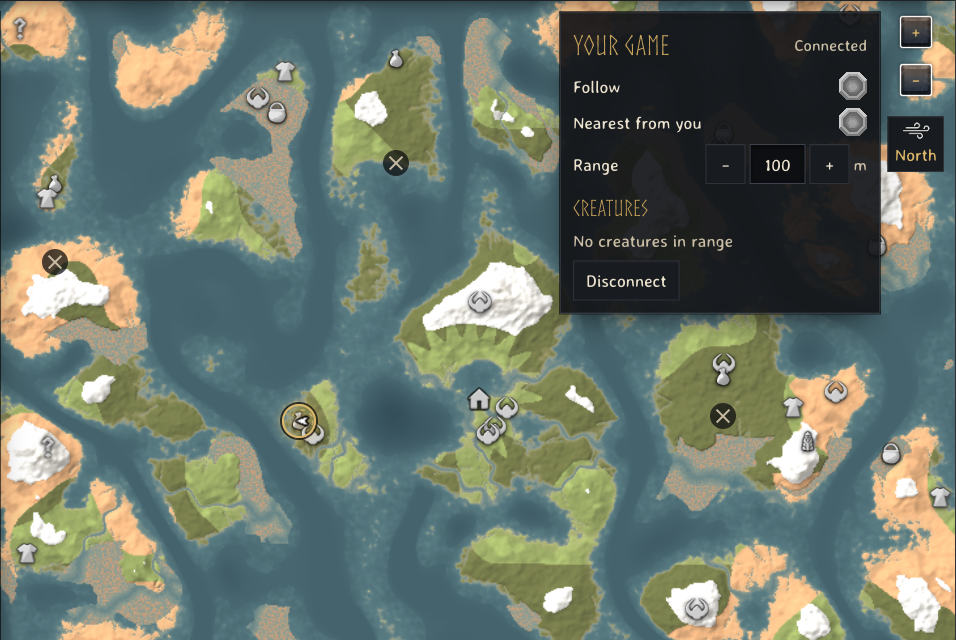
What the map shows while you play
- You, as the game's own map arrow, turned the way you face, every second.
- Other players, the same ones the in-game map shows: only those who share their position there.
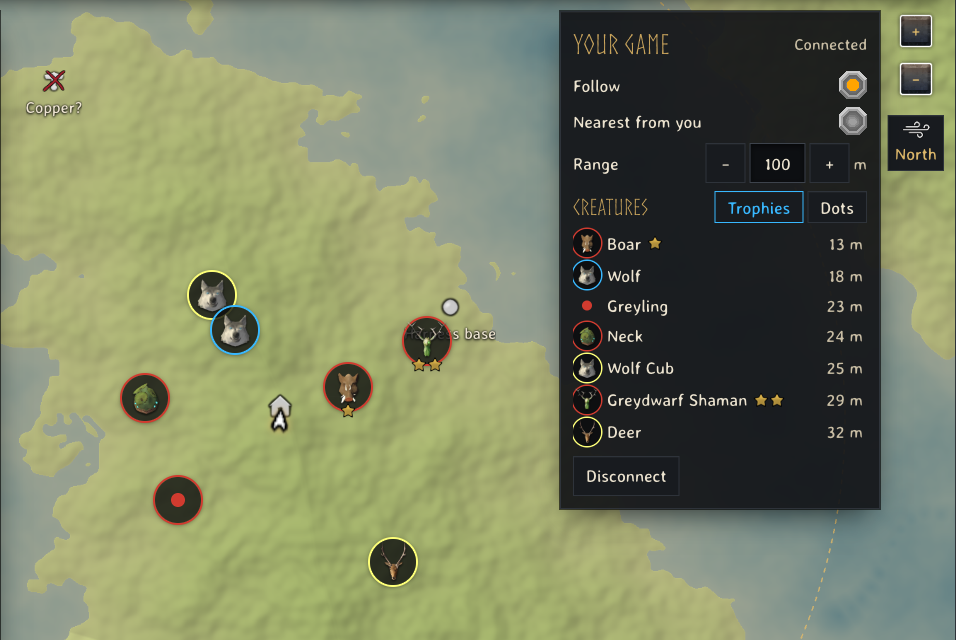
- Creatures around you within the range you set, each shown as its trophy on a ring that says whether it is hostile (red), tamed (blue) or passive (pale), with its stars. A young animal shows its adult's trophy; a creature the game gives no trophy, such as a Greyling, keeps a dot. If you prefer, switch the creature list to Dots and every creature is a small dot in the same colours. The game keeps creatures only in the ground loaded around you, so the range stops there: 128 m with the game's original simulation distance, more on higher settings.
- Your map pins, with the game's own pin icons and the cross on the ones you checked off.
- The trader camps your world kept. Haldor, Hildir and the Bog Witch each have ten possible camps on the seed map. The first one whose ground your world generates stays, and the game removes the other nine. Once your game has placed a camp, the map rings it in gold and strikes out the rest.
- Nearest from you. Search runs from where you stand instead of the starting stones: the nearest Copper Ore, the nearest Troll cave, the nearest water for Northern Salmon.
Install
The mod needs BepInEx Pack Valheim, which every Valheim mod manager installs.
With r2modman, Thunderstore Mod Manager or Gale: install BepInEx Pack Valheim from the manager's online list, download thevalheimwiki-LiveSeedMap-1.0.1.zip, and import it as a local mod (in r2modman: Settings, Import local mod). Start the game with the manager's modded button.
With Vortex or by hand: install BepInEx Pack Valheim, then download
LiveSeedMap-1.0.1.zip and drop it on
Vortex's mods page, or extract it into your Valheim folder so that
BepInEx/ exists.
The SHA-256 sums of both files are in SHA256SUMS.txt.
Connect
- Start Valheim and load your world.
- Open the seed map and press Connect game in the Your game panel. Chrome and Edge ask once whether the page may reach apps on this device; allow it.
- If the map shows another seed, press Open its map in the panel.
The map remembers the connection. Next time it finds your game by itself, and when you start the game after opening the page, switching back to the page connects it.
Follow keeps the map centred on you. Nearest from you makes every search on the map run from where you stand. Range sets how far around you creatures are listed.
It stays on your computer
The mod answers only on 127.0.0.1, the address of your own computer, and
only to pages from thevalheim.wiki. Nothing goes over the internet and nothing
reaches our servers. The mod reads the game and changes nothing in your world
or your character.
Settings
The file BepInEx/ appears after the
first start:
| Setting | Default | What it sets |
|---|---|---|
Interval | 1 | seconds between updates |
Origins | https:/ | pages allowed to read your game |
When the map does not find your game
- Game not found: the game is not running, the world is not loaded yet, or the mod is not installed. Load the world, then return to the page.
- The browser blocked it: in Chrome or Edge, open the site settings of thevalheim.wiki and allow the local network access you refused.
- Port taken: the BepInEx log (
BepInEx/) says so. Close the program that holds port 45892.LogOutput.log
Tools & mods
- Live Seed Map mod for Valheim: install it, connect it and track places in your game
- How to install Valheim mods on a Mac, natively on Apple Silicon without Rosetta
- Valheim save file location for worlds and characters on Windows, macOS and Linux
- Valheim seed map guide: where your world's bosses and traders are
- Valheim food and gear planner: check armour and health before a boss
- Valheim build cost calculator: total materials for a whole build
- Valheim fishing: the bait for each fish, where it spawns and how to land it