
Valheim 1.0.16
How to install Valheim mods on a Mac, natively on Apple Silicon without Rosetta
Valheim runs natively on Apple Silicon Macs, and its mods can too. The mod managers Windows players use do not run on macOS, so on a Mac you install the mod loader once by hand, give Valheim one launch option in Steam, and put each mod in a folder. After that, Valheim starts from Steam as usual, with every mod you added.
Which mod managers work on a Mac?
None of the usual ones.
| Mod manager | Runs on |
|---|---|
| r2modman | Windows, Linux |
| Gale | Windows, Linux |
| Thunderstore Mod Manager | Windows |
| Vortex (Nexus Mods) | Windows |
The mods themselves are the same files on every system, so a Mac uses the downloads Windows players use. Thunderstore, where most Valheim mods are published, has a Download button on every mod's page that gives you the same zip a manager would install. Nexus Mods and CurseForge list Valheim mods too, and their files go in the same folders.
Why does the usual BepInEx not work on Apple Silicon?
Valheim mods run on BepInEx, the mod loader. BepInEx Pack Valheim, the copy every mod manager installs, carries a Mac library for Intel processors only. The official BepInEx 5.4.23.5 release loads on an M-series Mac but stops before it loads any mod: macOS does not let it change the game's code in memory the way it does on Windows. Running Valheim under Rosetta gets around that and costs speed.
BepInEx has since fixed this in its source code, together with the loader library it starts from, but neither fix is in a regular release yet. The package below is BepInEx built from that source, with the fixed loader library, set up for Valheim. It runs on Apple Silicon without Rosetta.
How do I install BepInEx for Valheim on a Mac?
- Quit Valheim.
- Download BepInEx_macos_valheim_5.4.23.5-01fd4aa.zip. Its SHA-256 sum is in SHA256SUMS.txt.
- Open Terminal and unpack it into Valheim's folder:
cd "$HOME/- In the same Terminal window, print the launch option for your Mac and copy the line it prints:
echo "\- In Steam, right-click Valheim in your Library, choose Properties, and paste the line into Launch options on the General page.
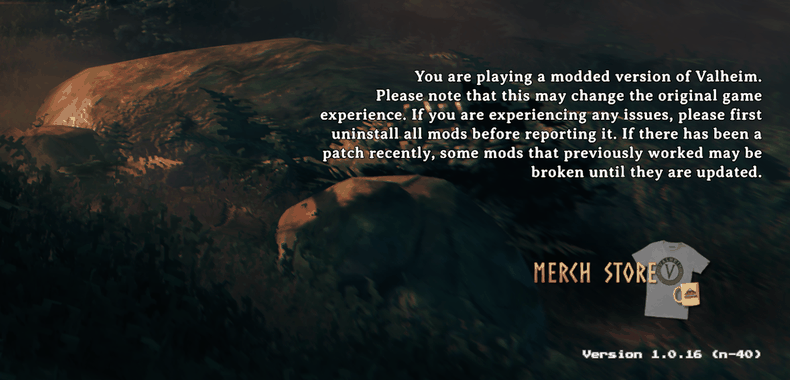
- Start Valheim from Steam. The main menu says "You are playing a modded
version of Valheim" at the bottom right, and the Valheim folder now holds
BepInEx/, the loader's log.LogOutput.log
If your Steam library is on another drive, open Valheim's folder from Steam
instead: right-click Valheim, then Manage, then Browse local files. In
that Finder window press ⌘↑ to go up one level, then drag the Valheim folder
onto Terminal's icon in the Dock. A Terminal window opens in that folder;
continue there with the unzip line, without the cd line.
Without Terminal: open the zip, which gives you a folder of the same name, and
move what it holds into Valheim's folder, beside valheim.app. Then type the
launch option yourself: the full path to run_bepinex.sh in double quotes,
followed by %command%. In the default Steam library the path starts with
/ and your user name; ~ does not work there.
After the install, Valheim's folder holds:
| File or folder | Job |
|---|---|
valheim.app | the game, unchanged |
run_bepinex.sh | starts Valheim with the loader; Steam runs it through the launch option |
libdoorstop.dylib | the loader library the script hands to the game |
BepInEx/ | BepInEx itself |
BepInEx/ | your mods |
BepInEx/ | the settings of BepInEx and of each mod, written at the first start |
How do I add a mod?
- Download the mod. On Thunderstore, press Download on the mod's page.
- Open the zip. A Thunderstore zip holds
manifest.json,README.md,icon.pngand the mod's own files. - In
BepInEx/, make a folder for the mod, for exampleplugins BepInEx/, and move the zip's contents into it. If the zip has aplugins/ ValheimModding-Jotunn pluginsfolder, move what is inside that folder instead. Aconfigfolder in the zip goes intoBepInEx/.config - Install what the mod needs. Its Thunderstore page lists the mods it depends on; add each the same way. Skip BepInEx Pack Valheim: the package above takes its place.
- Start Valheim.
BepInEx/lists every mod it loaded, oneLogOutput.log Loading [...]line each.
These mods loaded natively on an Apple Silicon Mac with this package: Jotunn, VNEI, YamlDotNet, Zen.ModLib, ZenSign, PlantEasily, Valheim Configuration Manager, Runic Clock, Auto Stash, LiveExperienceTracker, Remember Server Password, Craft Me Once and Live Seed Map.
A mod's settings are in BepInEx/, in a .cfg file named after the mod,
once Valheim has started with it.
How do I play without mods?
Clear the launch option in Steam, and Valheim starts without BepInEx; the files
stay where they are for next time. To remove one mod, delete its folder from
BepInEx/.
Example: installing the Live Seed Map mod
Live Seed Map shows your running game on the seed map: where you stand, the creatures around you, your pins and portals, and it can mark any place from the map in your game.
- Download LiveSeedMap-1.4.0.zip.
- Unpack it into Valheim's folder. This zip is already laid out for BepInEx,
so the mod lands in
BepInEx/:plugins/ LiveSeedMap
cd "$HOME/- Start Valheim from Steam.
BepInEx/now has the linesLogOutput.log Loading [Live Seed Map 1.4.0]andListening on http:/./ 127.0.0.1:45892 - Load your world, or join your server.
- Open the seed map in Chrome or Edge and press Connect game. When the browser asks whether the page may reach apps on this device, allow it.
- If the map shows a different seed, press Open its map.
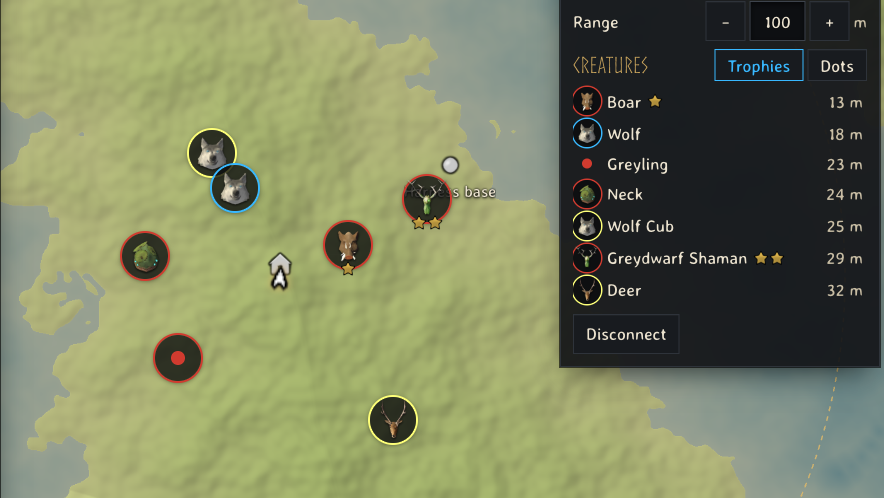
Everything the mod shows and does, and its settings, are in the Live Seed Map guide.
What if the mods do not load?
- No "modded version" line on the main menu, and no
LogOutput.log: check the launch option. It is the full path torun_bepinex.shin double quotes, then%command%. - A file named
preloader_and a date, ending in.log, besiderun_bepinex.shor insidevalheim.app/: BepInEx stopped before loading mods. This is what the official 5.4.23.5 release and the BepInEx files of BepInEx Pack Valheim do on Apple Silicon. Unpack the package above again over them, and delete the log insideContents/ MacOS valheim.app: the app is signed, and a file added inside it breaks that signature. Could not load [...] because it has missing dependenciesinLogOutput.log: install the mods named on that line.- A mod misbehaves in the game: its own messages are in
BepInEx/, and the game's are inLogOutput.log ~/.Library/ Logs/ IronGate/ Valheim/ Player.log
If you play with others, the server and the other players need the same versions of any mod that changes the world, whatever computer each of them plays on.
Tools & mods
- Live Seed Map mod for Valheim: install it, connect it and track places in your game
- Valheim live map: your running game on your seed map
- Valheim save file location for worlds and characters on Windows, macOS and Linux
- Valheim seed map guide: where your world's bosses and traders are
- Valheim food and gear planner: check armour and health before a boss
- Valheim build cost calculator: total materials for a whole build
- Valheim fishing: the bait for each fish, where it spawns and how to land it